RLU.AI
  • AI Photo Styles
  • Pricing
  • Blog
  • Contact
RLU.AI

Transform your photos with AI. Discover the ReaL U - RLU.AI

Email
Featured on:
aibesttop AI Tools Directory|Featured on ShowMeBestAIFeatured on toolfame.comNextGen Tools BadgeFeatured on Dofollow.ToolsFeatured on saasfame.comAMZdir|Featured on findly.tools
Popular AI Styles
  • All AI Styles
  • AI Age Progression
  • Corporate Headshots Generator - AI Executive Headshot & Professional Business Portrait Maker
  • AI Headshot Background Generator - Professional Headshot Background & Red Background Portrait Maker
  • What to Wear for Professional Headshots - AI White Shirt Professional Headshot Generator
  • Grey Headshot Background - AI Gray Background Headshot & Neutral Background Generator
  • Business Casual Headshots - Free AI Casual Headshots & Casual Corporate Headshots Generator
AI Tools
  • Eyes Follow Mouse
  • AI Headshot for LinkedIn
  • AI Headshot Safety Checker
  • Casual LinkedIn Headshot
  • How to Take a LinkedIn Headshot
  • How to Take a Professional Headshot at Home
  • How to Take a Professional Headshot with iPhone
  • Headshot Prep Planner
  • What to Wear for LinkedIn Headshot
  • Medical Professional Headshots
  • Professional Headshots for Acting
  • Professional Headshot Booth Planner
  • Professional Headshot Cost Estimator
  • Professional Headshot Editing Tips
  • Professional Headshot Guidelines
  • Professional Headshot Pose
  • Professional Headshot Lighting Setup
  • Prompt for Professional Headshot
Resources
  • Pricing
  • Blog
Company
  • Contact
  • Partners
  • Waitlist
Legal
  • Privacy Policy
  • Terms of Service
© 2026 RLU.AI All Rights Reserved.
| Traded as Linkup Ai., Co Ltd
Climate CommitmentTinyLaunch BadgeFeatured on ToolPilot
Hybrid Mode · Tool + Report

Prompt for Professional Headshot

Build a professional headshot prompt, then review its limits and next steps here.

Jump to the prompt builder
Prompt input workspace

Set core variables and generate reusable prompt variations in under one minute.

Optional: add a reference photo preview

The photo stays in your browser for this preview. It is not uploaded to our server, sent to an image model, or scored for image quality.

Upload a reference photo

Drag and drop or click to browse

Supported formats: JPG, PNG, WEBP (max 10MB)

Quick presets

4

Deterministic mode enabled: core prompt builder works without external model calls.

Prompt output and validation

Review your prompt variations, setup checks, and next action.

Run the builder to generate your prompt pack

You will see reusable prompt variations, setup checks, and next-step guidance here.

Executive summary

Decision summary

Core conclusions, measurable indicators, and applicable boundaries.

Fit among listed scenarios

Listed examples4/5Applicable: 4Not applicable: 1

Counts only the examples listed here; it is not a market coverage estimate.

Prompt pack snapshot

Core variables: Corporate trust / Neutral studio / Business formal

Target: LinkedIn profile, tone: Confident and calm

Setup checks passed: 4/5

5 explicit choices

Five choices make the intended headshot easier to describe.

The builder combines style, background, attire, platform, and tone into a reusable starting brief.

Boundary: These inputs do not predict likeness or image quality; inspect generated results and iterate.

400 x 400 + 8MB

LinkedIn upload requirements belong in the final export check.

LinkedIn Help lists supported dimensions, a maximum file size, and PNG or JPG formats.

Boundary: Prompt text cannot set the rendered file dimensions or size; verify the latest platform rules at export.

n = 610

A second opinion can help counter self-selection bias.

In two internet studies (n=610), other-selected profile images received more favorable impressions than self-selected images.

Boundary: This finding guides selection workflow, not model architecture.

No AI filters

Regulated ID use cases must not reuse stylized professional headshot prompts.

U.S. passport guidance explicitly disallows changing photos with software, filters, or AI.

Boundary: This page targets business identity photos only, not government ID workflows.

Model rewrite + lifecycle

Prompt portability requires model-version tagging, not one universal sentence.

OpenAI removed the DALL·E 2 and DALL·E 3 API snapshots on 2026-05-12 and recommends GPT Image models as replacements; prompt behavior can vary by model.

Boundary: This is a vendor-specific lifecycle notice, not a cross-model benchmark; retest prompts in the model you choose.

Persona / scenarioApplicableNot applicableSuggested action
Job seeker updating LinkedInNeeds fast prompt baseline and profile-safe framing.If user expects passport-compliant output from the same prompt.Generate prompt pack, run 3 iterations, then external review.
Medical expert team pageNeeds clean attire cues and conservative trust signal.If visual branding requires artistic or cinematic rendering.Use medical preset and enforce natural skin texture checks.
Founder media kit ownerNeeds both credibility and narrative personality.If all outputs must be uniform across a large team directory.Use creative preset but review policy-safe boundaries before publish.
HR team managing 50+ profilesNeeds repeatable prompt templates and copy packs.If each profile requires fully custom storytelling prompts.Lock one template per role family and standardize negative prompt rules.
Government ID applicantNot applicable for regulated ID photo workflows.Passport, visa, and official identity documentation scenarios.Use official photo requirements instead of AI prompt generation.
Method

Method and review checks

How inputs shape the prompt and which configuration checks are applied; image quality still needs human review.

Tool reasoning flow

InputsPromptValidateDecide

Flow goes from normalized inputs to decision output with explicit step inputs/outputs.

Human review after generation

Qualitative review prompts only; they are not weighted or an approval to publish.

  • Likeness fidelity

    Facial structure and micro-expression remain close to the subject.

  • Platform fit

    Framing and tone match where the photo will be used.

  • Lighting realism

    Lighting is plausible, skin texture stays natural, no waxy effect.

  • Styling consistency

    Attire and background align with role and industry expectations.

  • Artifact suppression

    Negative prompt prevents extra fingers, warped eyes, and fake logos.

Intent normalization

Map user intent to style, platform, and tone to avoid ambiguous prompts.

Input: Style + platform + tone selections

Output: Role-aware prompt skeleton

Guardrail injection

Append negative prompt rules to suppress common realism failures.

Input: Prompt skeleton + negative rule library

Output: Main prompt + negative prompt pair

Configuration review

Check a short set of explicit configuration and workflow conditions; this is not an image-quality score.

Input: Selected options + rights and iteration confirmations

Output: Passed checks + configuration notes

Decision layer

Show applicable boundaries and the next action; generated images still need human review.

Input: Setup checks + evidence map + risk table

Output: Configuration notes and a manual review path

Evidence

Evidence and known unknowns

Source-backed facts, observed timestamps, and unresolved evidence gaps.

Source and evidence updates

Published 2026-02-18Updated 2026-10-07

Closed items include traceable sources; rows marked pending/no reliable public data remain hypotheses instead of hard conclusions.

GapImpactActionStatus
Model guidance needed current first-party lifecycle evidence.Could mislead teams into assuming one prompt stays stable across model upgrades.Rechecked current OpenAI docs: DALL·E 2/3 API snapshots were removed on 2026-05-12; the deprecation page recommends GPT Image models as replacements.Rechecked 2026-10-07
Cross-platform authenticity boundaries were under-specified.Teams might reuse heavily edited headshots where platform rules require realistic photos.Added LinkedIn likeness policy and Google Business “represent reality / no excessive alteration” guidance with explicit dates.Closed
Selfie distance distortion risk had no quantitative evidence.Close-range references can produce unprofessional facial proportions even when prompts look correct.Added JAMA 2018 camera-distance evidence (12-inch vs 5-foot distortion) as a hard boundary for reference inputs.Closed
Image review needs caveats about differences in image quality and capture conditions.Without quality controls, teams may overtrust low-quality captures in sensitive review flows.Added NIST FRTE notes on image-quality dependence and camera pitch misadjustment risk.Closed
No reliable public causal dataset maps headshot prompts or image checks to hiring conversion uplift.Any direct “prompt checks => conversion%” claim would be overconfident.Marked as pending; keep as experiment hypothesis and require controlled A/B tracking before external claims.Pending: no reliable public data

Evidence coverage

9known facts

9 validated facts and 4 open evidence gaps.

Published: 2026-02-18 · Research updated: 2026-10-07

LinkedIn Help: Photo won't upload to your profile

High

Official platform documentation · Accessed 2026-10-07 · page label: Last updated 2 years ago

LinkedIn profile photos must be 400x400 to 7680x4320, up to 8MB, JPG/PNG.

Open source

LinkedIn Help: Profile photo guidelines and conditions

High

Official platform policy · Accessed 2026-10-07 · page label: Last updated 2 years ago

Profile photos must reflect your likeness; non-compliant profile images may be removed.

Open source

Google Business Profile Help: Photo guidelines

High

Official platform policy · Accessed 2026-10-07

Photos should be JPG or PNG, 10KB-5MB, with 720x720 recommended and 250x250 minimum; avoid significant alterations and excessive filters.

Open source

OpenAI Docs: Image generation guide

High

Official model documentation · Accessed 2026-10-07

The current guide documents GPT Image models and their generation and editing workflows.

Open source

OpenAI API Docs: DALL·E deprecations

High

Official model lifecycle notice · Accessed 2026-10-07 · retirement date: 2026-05-12

OpenAI removed DALL·E 2 and DALL·E 3 API snapshots on 2026-05-12 and recommends GPT Image 2, GPT Image 1, or GPT Image 1 Mini.

Open source

U.S. Department of State: U.S. Passport Photos

High

Official government guideline · Last updated 2025-12-15 · accessed 2026-10-07

Passport guidance prohibits changing photos with software, apps, filters, or artificial intelligence.

Open source

JAMA Facial Plastic Surgery: Selfie distance distortion study

High

Peer-reviewed study · Published 2018-03-01 · accessed 2026-10-07

At 12-inch distance, perceived nasal size increases ~30% (male) / ~29% (female) compared with 5-foot portrait distance.

Open source

Cognitive Research: The curse of self in profile image selection

High

Peer-reviewed study · Published 2017-04-14 · corrected 2021-08-13 · accessed 2026-10-07

Across two internet studies (n=610), other-selected profile images produced more favorable impressions than self-selected images.

Open source

NIST FRTE demographics: quality and pitch-angle risk notes

High

Government benchmark · Table last updated 2025-03-05 · accessed 2026-10-07

NIST notes false negatives depend strongly on image quality and camera misadjustment can induce pitch-angle variation.

Open source

PixPretty prompt list article (supporting SERP sample)

Medium

SERP competitor content · Accessed 2026-02-18

Contains static prompt lists and tips, useful as baseline comparison but not policy-grade evidence.

Open source
ClaimData pointBoundarySource
LinkedIn profile photos have explicit size and format constraints.LinkedIn Help states 400x400 to 7680x4320, up to 8MB, JPG/PNG.Prompt quality cannot replace final export validation for dimensions and file size.LinkedIn Help (a549049)

Accessed 2026-10-07 · page label: Last updated 2 years ago

LinkedIn requires profile photos to reflect your likeness.The policy allows removal of profile images that violate photo conditions.This is a moderation rule, not a guarantee that any realistic image is brand-appropriate.LinkedIn Help (a1377087)

Accessed 2026-10-07 · page label: Last updated 2 years ago

Google Business photo policy requires authenticity and basic technical thresholds.Google recommends 720x720 resolution and sets 250x250 as the minimum; files must be 10KB-5MB.This applies to Google Business Profile; teams must still verify each destination platform.Google Business Profile Help

Accessed 2026-10-07

OpenAI’s current image-generation guide documents GPT Image workflows.The image guide covers GPT Image generation and editing; model names and available controls can change over time.This describes OpenAI’s API only and is not evidence that prompts behave the same across providers.OpenAI image generation guide

Accessed 2026-10-07

Model lifecycle changes can invalidate stable prompt assumptions.OpenAI removed the DALL·E 2 and DALL·E 3 API snapshots on 2026-05-12 and lists GPT Image models as replacements.Lifecycle notice is vendor-specific; keep version tags and replay tests across all providers.OpenAI Image API changelog

Accessed 2026-10-07 · retirement date: 2026-05-12

Regulated ID workflows disallow AI-edited images.U.S. passport guidance explicitly prohibits software, apps, filters, and AI alterations.This applies to U.S. passport workflows and should be treated as a hard exclusion boundary.U.S. Department of State

Last updated 2025-12-15 · accessed 2026-10-07

Short camera distance can materially distort perceived facial proportions.JAMA model reports ~30% (male) / ~29% (female) perceived nasal enlargement at 12 inches versus 5 feet.This is geometric distortion evidence, not a direct hiring or conversion outcome metric.JAMA Facial Plastic Surgery (PMC)

Published 2018-03-01 · accessed 2026-10-07

Self-selection bias affects final profile-image choice quality.Two internet studies (n=610) reported more favorable impressions for other-selected profile photos.This supports review workflow design, not model architecture ranking.Cognitive Research, 2017

Published 2017-04-14 · corrected 2021-08-13 · accessed 2026-10-07

Image-quality and camera-angle issues can increase automated decision errors.NIST FRTE notes false negatives are strongly tied to image quality and camera misadjustment can induce pitch-angle variation.Evidence comes from biometric evaluation; use as risk guardrail, not a direct business KPI predictor.NIST FRTE demographics

Table last updated 2025-03-05 · accessed 2026-10-07

Evidence gapStatusImpactMinimum path
Prompt performance benchmark under identical prompts across model vendorsPending: no reliable public apples-to-apples benchmarkVariant ordering can change after model updates and safety policy shifts.Replay top variants monthly, log model/version/policy settings, and archive failures.
Causal relationship between headshot choices and hiring/reply conversionPending: no reliable public causal datasetDirect percentage-lift claims would likely overstate certainty.Treat this as an open evidence gap and run controlled tests before making external outcome claims.
Cross-region disclosure requirements for AI-generated profile imagesOpen: no unified global disclosure standard found in public sourcesTeams may under-disclose synthetic edits in regulated or high-trust sectors.Add legal checkpoint per target market before publishing externally.
Demographic-specific thresholds for human headshot reviewPartial evidence only; no open threshold standardA single universal threshold may underperform for diverse populations.Track anonymized review outcomes by cohort and tune thresholds quarterly.
Tradeoffs

Alternatives and tradeoffs

Compare this hybrid workflow with static prompt lists, chat-only, and studio-only paths.

Qualitative tradeoffs, not a cross-tool performance benchmark. Choose based on team size, budget, and how much human review you need.

DimensionThis pagePrompt listChat onlyStudio only
Policy boundary clarityIncludes LinkedIn, Google Business, and U.S. passport boundaries with dates.Mostly style tips with limited policy mapping.Policy coverage depends on user prompts and model answers.Strong capture guidance, but digital-disclosure boundaries may be absent.
Model portability risk controlGeneral wording variations + model-version tagging + lifecycle reminders.One-size-fits-all text with no version trace.Can adapt quickly, but history and reproducibility are weak.Low model dependency, high scheduling dependency.
Evidence traceabilitySource list + observed dates + open evidence-gaps table.Usually no timestamps or uncertainty markers.Citation quality varies by session and prompt rigor.Portfolio-heavy evidence, often without structured citations.
Failure-mode handlingExplicit guardrails for over-stylization, crop mismatch, and compliance misuse.Mostly positive prompts; negative guardrails are sparse.Depends on operator discipline to remember edge cases.Physical setup risks are managed, but AI-edit misuse is out of scope.
Team governance readinessPrompt pack, checklist, and risk matrix support repeatable reviews.Manual copy/edit flow with weak audit trail.Fast ideation, harder to standardize across reviewers.Consistent with one vendor, expensive to scale frequent updates.
Causal outcome certaintyExplicitly marks conversion-lift claims as pending without reliable public causal data.Often uses implied outcome claims without method notes.May generate confident percentages without reproducible backing.Can show portfolio outcomes, but cross-channel causal attribution remains difficult.

Need a fast go/no-go decision first?

Generate the prompt pack, review any configuration notes, then inspect the rendered image and destination rules.

See prompt guide
Risk

Risk and mitigation matrix

Concrete misuse, compliance, and mismatch risks with executable mitigation steps.

Risk heatmap

impactprobability

Red points indicate high-impact risks that should be mitigated first.

RiskProbabilityImpactMitigation
Over-stylized output can violate professional authenticity expectations.MediumHighCap stylization tokens, enforce realism negatives, and cross-check LinkedIn/Google reality rules before publish.
Close-range selfie references can produce distorted facial proportions.MediumHighPrefer portrait-distance captures over 5 feet for reference images and reject extreme close-up inputs.
Using headshot prompts for passport/visa workflows creates compliance exposure.LowHighHard-block regulated ID use cases and route to official government photo requirements.
Owner-only final selection can lock in self-selection bias.MediumMediumRequire at least one external reviewer and keep rationale for final picks.
Model lifecycle changes can break previously stable prompts.MediumMediumTag outputs with model/version, monitor changelogs, and replay critical prompt packs monthly.
Claiming direct hiring-conversion uplift without causal evidence can mislead stakeholders.MediumHighMark as pending by default and publish outcome claims only after controlled A/B validation.

Scenario playbooks

PremiseProcessOutcome

Example workflows with a premise, process, and review outcome.

Illustrative workflows, not measured customer results or performance benchmarks.

SaaS founder LinkedIn refresh

Premise: Needed to replace a 3-year-old profile image before fundraising outreach.

Process: Used founder-modern preset, ran 4 iterations, and applied external reviewer selection.

Outcome: The workflow separates a LinkedIn baseline from later fundraising-specific edits; no measured outcome is claimed.

Healthcare team profile rollout

Premise: Hospital marketing team needed consistent profile photos for 30 clinicians.

Process: Locked one medical preset, standardized negative prompts, and reused copy pack.

Outcome: A shared prompt template makes differences easier to review; each person’s final image still needs inspection.

Creative founder press kit split strategy

Premise: Founder needed one polished profile for LinkedIn and one expressive variant for media outreach.

Process: Generated one conservative and one expressive variant with separate publish boundaries.

Outcome: Keeping variants separate makes channel fit easier to review; it does not guarantee engagement.

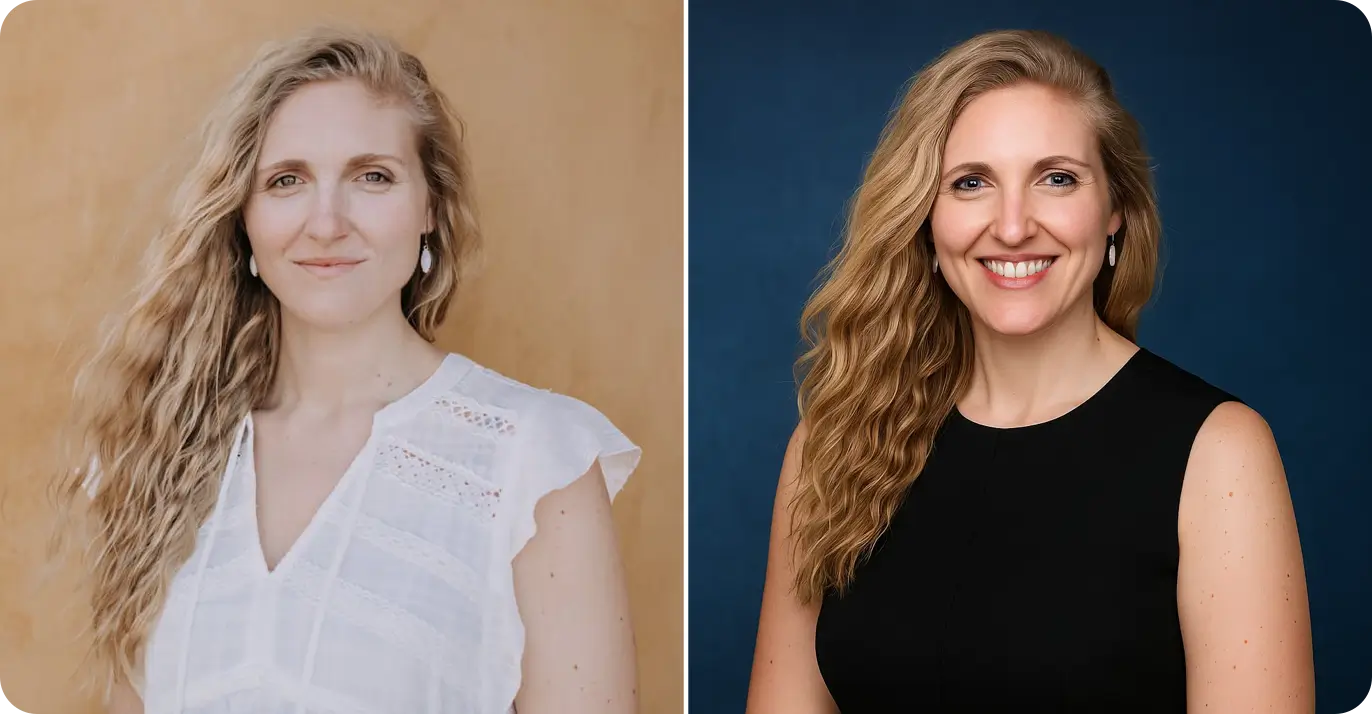
Realism reference gallery

These reference images help calibrate natural texture and professional framing. They are not outputs from this builder or quality guarantees.

Professional headshot example 1
Example

Example 1: realism reference

Workflow

How to use this page

A four-step flow from input to publish decision.

  1. 1Step 1

    Select context variables

    Choose style, background, attire, platform, and tone before writing any free-form notes.

  2. 2Step 2

    Generate prompt pack

    Run the builder to get the main prompt, negative prompt, and wording variations.

  3. 3Step 3

    Review setup checks and boundaries

    Review setup checks and notes; inspect the generated image manually.

  4. 4Step 4

    Publish with review gate

    Keep one external reviewer in the final gate and map each variant to its target platform.

FAQ

FAQ

Answering operational, strategy, and compliance questions.

More tools

Related tools

Continue to generation, editing, and policy validation workflows.

AI Headshot for LinkedIn

Apply your generated prompt pack directly in a LinkedIn-focused workflow.

Professional Headshot Guidelines

Validate platform policy and team-level governance before publishing.

Professional Headshot Pose

Check posture, framing, and confidence cues to pair with your prompt.

Professional Headshot Lighting Setup

Tune light direction and contrast so prompt intent survives rendering.

Professional Headshot Editing Tips

Apply subtle post-processing without breaking likeness fidelity.

Professional Headshot Cost Estimator

Estimate budget impact when choosing between AI and studio workflows.

Ready to test your professional headshot prompt?

Keep the prompt pack, try it in your chosen image model, and review the actual output before publishing.

Run prompt builder againOpen AI styles